
Let's hands on LAUNCHXL2-TMS57012 - GPIO/UART
- Janardan

- Jul 17, 2025
- 2 min read
Let's learn how to generate code using HAL Code Generator, we shall toggle some GPIOs and enable UART to print some texts out.
open HAL CoGen, File>RecentPRojects>Project_Name, you can do this to import project what we have already created in earlier blog.
In HAL CoGen, go to "Driver Enable" table and make sure GPIO and SCI drivers are enabled.

Go to PINMUX tab and enable GIOA, GIOB and SCI as below.

Go to SCI>SCI Global and Enable "Asynchronous Mode" and Internal Clock.

Go to SCI>SCI Data Format tab and do below configurations.
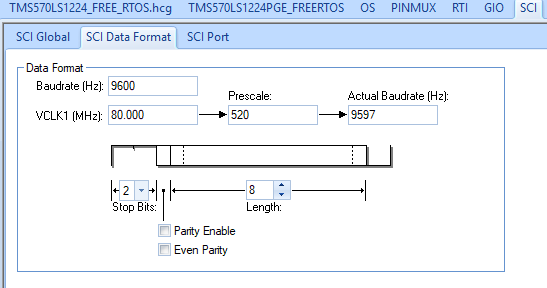
Go to SCI>SCI port tab and do below configurations.

File>Save Project, File>Generate Code, now that is all we need to do from HAL CoGen
Open project in CCS, open "sys_main.c" replace code in this file with below code.
#include "sys_common.h"
#include "sci.h"
#include "sys_common.h"
#include "reg_gio.h"
/* USER CODE BEGIN (1) */
/* USER CODE END */
/** @fn void main(void)
* @brief Application main function
* @note This function is empty by default.
*
* This function is called after startup.
* The user can use this function to implement the application.
*/
/* USER CODE BEGIN (2) */
/* USER CODE END */
void sciDisplayText(sciBASE_t *sci, uint8 *text, uint32 length);
void sciDisplayText(sciBASE_t *sci, uint8 *text, uint32 length)
{
while (length--)
{
while (!sciIsTxReady(sci)); // Wait for TX ready
sciSendByte(sci, *text++);
}
}
void delay(void)
{
volatile uint32 i;
for(i = 0; i < 1000000; i++) {} // crude delay
}
int main(void)
{
/* USER CODE BEGIN (3) */
/* USER CODE END */
sciInit(); // Initializes both sciREG and scilinREG
gioInit(); // Initialize the GIO module
uint8 message[] = "My First UART program on herculus\r\n";
// Set GIOB_1 and GIOB_2 as output (bit positions 1 and 2)
gioSetDirection(gioPORTB, (1U << 1) | (1U << 2)); // Set bit 1 and 2 as output
while (1)
{
// Set GIOB_1 = 1, GIOB_2 = 0
gioSetBit(gioPORTB, 1, 1);
gioSetBit(gioPORTB, 2, 0);
delay();
// Set GIOB_1 = 0, GIOB_2 = 1
gioSetBit(gioPORTB, 1, 0);
gioSetBit(gioPORTB, 2, 1);
delay();
sciDisplayText(sciREG, message, sizeof(message) - 1);
// for (volatile int i = 0; i < 500000; i++); // crude delay
}
return 0;
}
Now build the CCS project. hit hammer to build.

With this, executable file is created. as below.

So, now project is created and built, how to test it on hardware? Let's see it in next post.


Comments